


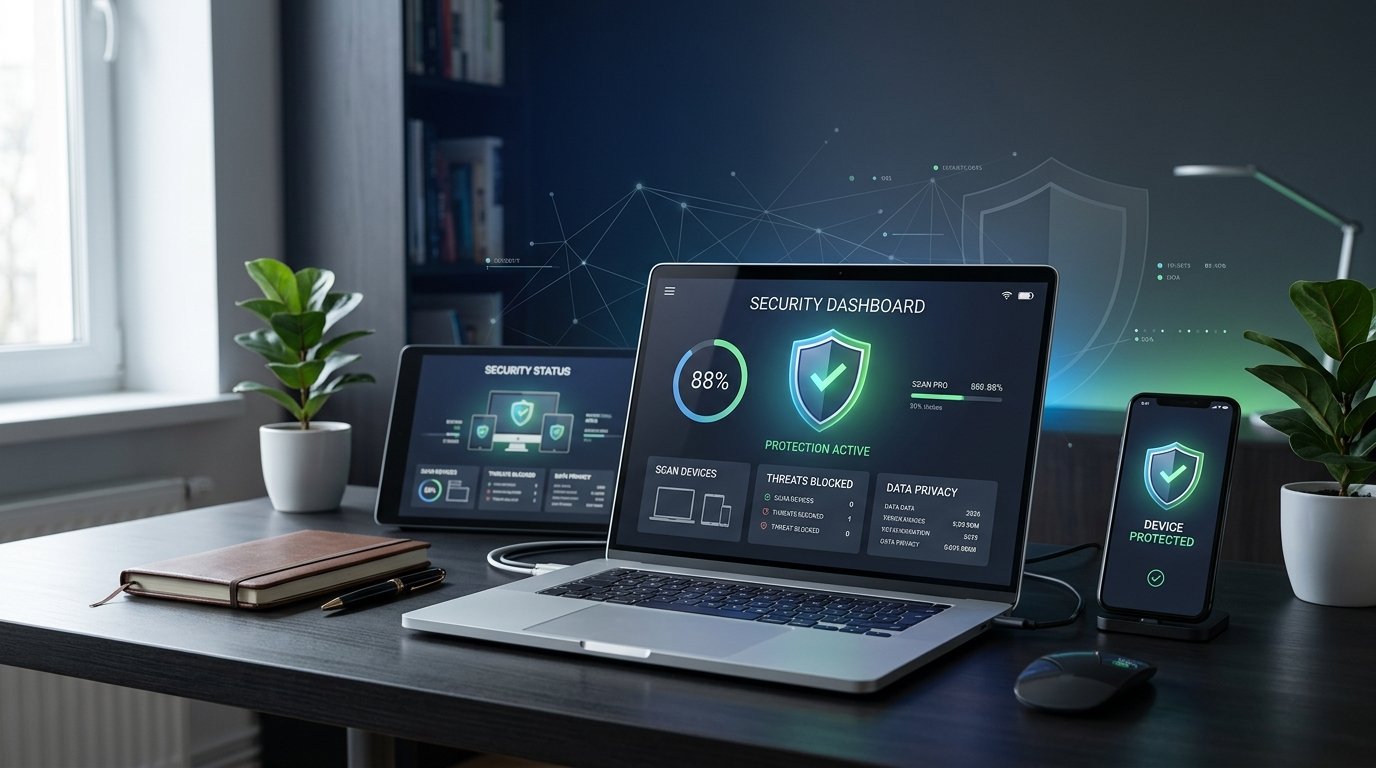
Keeping your devices and personal information safe online is more important than ever. Whether you use a laptop for work, a smartphone for everyday tasks, or a computer to manage an online business, cyber threats such as viruses, ransomware, spyware, phishing attacks, and malicious downloads can put your data at risk.
The good news is that modern antivirus software offers powerful tools to help protect your devices. Many security applications provide real-time threat detection, suspicious website blocking, ransomware protection, and additional privacy features. Some are available for free, while others offer comprehensive protection through paid subscriptions.
However, choosing the right antivirus software can be confusing because every product offers different features, device coverage, and pricing plans. In this guide, we explore the best antivirus software in 2026, compare free and paid options, and explain how to choose reliable protection for your devices and data without spending more than necessary.
Why Antivirus Software Is Important in 2026
Antivirus software helps detect, block, and remove malicious programs that may damage your device or compromise your information. Modern security tools can also help identify suspicious downloads, dangerous websites, and certain online scams.
For students, antivirus protection can help safeguard schoolwork, personal files, and online accounts. Professionals can use security software to protect important documents and work devices. Business owners may need additional protection for customer information, financial records, and company systems.
Although antivirus software is an important part of digital security, no application can prevent every threat. Safe browsing habits, regular software updates, strong passwords, multifactor authentication, and reliable backups are also essential.
Bitdefender Total Security: Best Overall Antivirus Software
Bitdefender Total Security is a strong option for users who want comprehensive protection across supported devices. It combines malware detection with additional security features that may include web protection, ransomware defenses, and tools designed to help users identify suspicious online activity.
It is useful for households that use computers and mobile devices for banking, shopping, work, and everyday browsing. Its range of features can help users manage several aspects of digital security from one application.
Bitdefender also offers different products and plans, so the exact features and number of supported devices depend on the package you choose. Some additional tools may be limited to particular operating systems or subscription tiers.
The main consideration is cost. If you only need basic protection on a Windows computer, a free solution may be sufficient. However, Bitdefender is worth considering if you want a broader security package.
Best for: Families, professionals, and users who want comprehensive security features.
Norton 360: Best for All-Round Digital Protection
Norton 360 is a comprehensive security suite that combines antivirus protection with additional tools, depending on the selected plan. These may include a VPN, password management, cloud backup, parental controls, and protection against certain online scams.
It can be useful for people who regularly shop online, manage sensitive documents, or want several security features in one subscription. Families may also appreciate plans that support multiple devices and offer parental control features.
Norton provides different packages, and not every plan includes the same benefits. Before purchasing, compare the supported devices, included features, renewal price, and subscription conditions.
Norton is a paid solution, so it may not be necessary for users who only want basic antivirus protection. However, it can be a practical option for those who value a broader collection of security tools.
Best for: Families, home users, remote workers, and people who want an all-in-one security suite.
Microsoft Defender: Best Free Antivirus for Windows
Microsoft Defender Antivirus is built into supported versions of Windows and provides real-time protection against many common malware threats. It can automatically scan files, monitor suspicious activity, and receive security intelligence updates through Windows.
For many home users, Microsoft Defender is a sensible starting point because it provides useful protection without requiring a separate antivirus subscription. It works alongside other Windows security features that help protect the system.
Users should keep Windows updated, leave real-time protection enabled, and review available security settings. Regular backups and safe browsing habits remain important even when the built-in antivirus is active.
Microsoft Defender does not include every feature offered by premium security suites. If you need specialized parental controls, cross-platform management, or additional privacy tools, compare third-party options before deciding whether to pay.
Best for: Windows users, students, home offices, and people who want basic protection without extra subscription costs.
Avast One: Best Free Antivirus Option
Avast One offers security features designed to help protect devices from malware and certain online threats. Depending on the platform and plan, its tools may include virus scanning, web protection, privacy features, and other security utilities.
The free option can be attractive to users who want an alternative to built-in protection. Paid plans may offer additional capabilities, so check the current feature list before upgrading.
Avast One is worth considering if you prefer a separate security application with a straightforward interface. However, review optional features and notifications carefully so you understand which tools are included and which require payment.
As with any antivirus product, download the software from the official website or a trusted app store. Avoid installing multiple real-time antivirus applications at the same time unless the providers specifically support that configuration.
Best for: Budget-conscious users, beginners, and people looking for a free antivirus alternative.
AVG Antivirus Free: Best for Basic Everyday Protection
AVG Antivirus Free is another option for users who want basic malware protection without purchasing a subscription. Its features can help detect malicious files and identify certain threats while users browse, download, and use their computers.
It can be useful for people who regularly use email, download documents, and visit everyday websites. The free version is designed to cover essential security needs, while additional features may be available through paid products.
AVG also offers broader security packages for users who need more than basic antivirus protection. Before upgrading, compare the extra features with the tools already available on your device.
If you choose AVG, keep its protection and updates enabled, and avoid clicking unfamiliar links or downloading attachments from unexpected messages.
Best for: Home users, students, and people who want basic antivirus protection on a limited budget.
Malwarebytes: Best for Malware Scanning and Threat Removal
Malwarebytes focuses on identifying and removing malware and other potentially unwanted software. It is particularly relevant for users who want an additional way to investigate suspicious activity or clean up a potentially compromised device.
Depending on the product and subscription, Malwarebytes can provide real-time protection and other security features. Free and paid offerings differ, so confirm which capabilities are available before installing or subscribing.
Malwarebytes can be useful when you suspect that an unwanted application or suspicious file has affected your computer. However, no single scanner can guarantee that every threat will be found or removed.
If you suspect a serious infection, disconnect the affected device from sensitive accounts when appropriate, run a reputable security scan, and change important passwords from a known-clean device if account compromise is possible.
Best for: Users who want malware scanning, threat removal, and additional security options.
ESET HOME Security: Best for Users Who Want Flexible Protection
ESET offers security products designed to protect supported computers and other devices from malware and online threats. Depending on the plan, features may include real-time scanning, web protection, firewall tools, and additional safeguards.
ESET can appeal to users who want a security application with configurable features. It may suit people who prefer to review security settings and tailor protection to their devices and habits.
Different ESET plans offer different capabilities, and supported features can vary by operating system. Check device limits and plan details before making a purchase.
As with other paid antivirus solutions, compare the cost of ESET with the protection and additional tools you actually need.
Best for: Home users, experienced computer users, and people seeking configurable security features.
McAfee: Best for Households With Multiple Devices
McAfee offers antivirus and broader digital security products designed for individuals and families. Depending on the subscription, features may include malware protection, web security, identity-related monitoring, and tools for protecting several devices.
It can be useful for households where different family members use laptops, smartphones, and tablets. Rather than purchasing separate subscriptions for each device, users can compare plans that cover multiple devices.
However, device limits, included features, and regional availability differ across plans. Some benefits may only be available in specific countries.
Before subscribing, make sure the plan covers your operating systems and check the renewal price. A multi-device package is most valuable when you actually need protection on several supported devices.
Best for: Families, multi-device households, and users who want centralized security management.
Avira: Best for Lightweight Security Options
Avira offers antivirus and security tools that may suit users looking for protection without an unnecessarily complicated setup. Depending on the product, it can provide malware scanning, real-time protection, and additional privacy or system tools.
Its free offering can be worth exploring if you want basic protection without immediately committing to a paid plan. Premium options may include more features, but the available tools vary by platform and subscription.
Before choosing Avira, compare its current features with your operating system’s built-in security tools. Also consider how it performs on your device and whether its additional features justify the cost.
Best for: Beginners, home users, and people who want a straightforward security solution.
Kaspersky: Best for Users Comparing Feature-Rich Security Suites
Kaspersky offers security products with features that may include malware protection, web safeguards, privacy tools, and additional controls, depending on the plan and operating system.
It can be included in a comparison if you are evaluating several established antivirus providers. However, users should consider more than detection features when choosing a security product.
Availability, legal restrictions, organizational policies, and trust considerations may differ by country and situation. Check current local guidance and official availability before installing or purchasing Kaspersky, especially if the device is used for work or business.
Compare its current plans with alternatives such as Bitdefender, Norton, and Microsoft Defender before making a final decision.
Best for: Users comparing comprehensive antivirus suites who have confirmed the product is available and appropriate for their location.
Best Antivirus Software Compared
Here is a quick overview of the antivirus options discussed in this guide.
| Antivirus Software | Best Use | Free Option | Main Consideration |
|---|---|---|---|
| Bitdefender Total Security | Comprehensive security | Free options vary by product and platform | Paid plan features and device limits |
| Norton 360 | All-round digital protection | Limited free options vary | Subscription and renewal cost |
| Microsoft Defender | Basic Windows protection | Yes, built into supported Windows versions | Fewer bundled extras than some paid suites |
| Avast One | Free antivirus alternative | Yes | Premium features and optional upgrades |
| AVG Antivirus Free | Everyday malware protection | Yes | Advanced tools may require payment |
| Malwarebytes | Malware scanning and removal | Yes, with limitations | Features depend on product and plan |
| ESET HOME Security | Configurable security | Plan-dependent | Device coverage and plan differences |
| McAfee | Multi-device protection | Plan-dependent | Check the number of covered devices |
| Avira | Basic and expanded security | Yes, with limitations | Compare free and paid features |
| Kaspersky | Comprehensive security suite | Plan-dependent | Check local availability and guidance |
The best option depends on your operating system, budget, and security requirements. Independent laboratory testing is also useful when comparing protection, system performance, and false alarms.
How to Choose the Best Antivirus Software in 2026
Selecting the right antivirus software is easier when you identify your needs before comparing products.
Identify Which Devices Need Protection
Start by listing the devices you use, including Windows computers, Macs, Android phones, and tablets. Not every antivirus product offers the same features on every operating system.
If you only use a Windows computer, Microsoft Defender may cover your basic needs. If you manage several devices across a household, a multi-device security plan may be more convenient.
Compare Free and Paid Options
Free antivirus software can provide useful protection for everyday tasks. Paid subscriptions may add features such as parental controls, VPN access, identity monitoring, cloud backup, and additional privacy tools.
Only pay for features you expect to use. If a free solution already meets your requirements, an upgrade may not provide enough additional value.
Check Independent Security Tests
Independent testing organizations, including AV-TEST and AV-Comparatives, evaluate antivirus products for factors such as malware protection, system performance, and false positives.
Look for recent results relevant to your operating system. A product that performs well in one test may not lead in every category, so consider multiple results rather than relying on a single ranking.
Consider System Performance
Some security applications can use more memory or processing power than others. If you have an older computer, choose software that provides reliable protection without noticeably affecting your everyday tasks.
Use reputable independent performance tests and, when possible, try a legitimate trial before committing to a paid plan.
Review Additional Security Features
Think about whether you need more than antivirus protection. Families may benefit from parental controls, while frequent travelers may want a separate VPN service. People who manage many passwords may benefit from a dedicated password manager.
Do not assume that every feature is included in every antivirus plan. Confirm what is covered and whether a separate subscription is required.
Read Renewal and Cancellation Terms
Promotional prices can be lower than renewal prices. Before subscribing, check the cost after the introductory period, automatic renewal conditions, refund policies, and the number of supported devices.
Understanding the full cost can help you avoid unwanted expenses later.
Tips to Protect Your Devices and Personal Data
Antivirus software is only one part of an effective security strategy. Follow these habits to reduce common risks.
- Keep your software updated: Install security updates for your operating system, browser, and applications.
- Enable real-time protection: Make sure your chosen antivirus is active and receiving updates.
- Use strong, unique passwords: Avoid reusing the same password across different accounts.
- Enable multifactor authentication: Add another layer of protection to email, banking, and important online accounts.
- Avoid suspicious links: Be careful with unexpected messages, fake delivery notices, and urgent requests for personal information.
- Download from trusted sources: Use official websites and reputable app stores rather than unknown download pages.
- Back up important files: Maintain backups so you can recover your data if your device is damaged or affected by ransomware.
- Review app permissions: Remove applications you no longer need and limit unnecessary access to your files, camera, microphone, and location.
These practices work together with antivirus software to provide stronger overall protection.
Common Antivirus Mistakes to Avoid
One common mistake is assuming that antivirus software makes every online activity safe. Even a strong security product may not stop every phishing attempt, scam, or newly discovered threat.
Another mistake is ignoring updates or disabling protection because an application displays too many notifications. Review legitimate security settings instead of leaving your device unprotected.
Avoid downloading cracked antivirus applications or using unauthorized activation keys. These can expose your device to malware and may put your personal information at risk.
It is also unwise to install multiple full antivirus products with real-time scanning enabled at the same time. They may conflict or affect system performance. If you decide to switch providers, follow the recommended uninstall process and verify that your new protection is active.
Finally, do not overlook backups and account security. Antivirus protection cannot replace a recovery plan or strong authentication.
Frequently Asked Questions (FAQs)
What is the best antivirus software in 2026?
Bitdefender Total Security and Norton 360 are strong options for comprehensive paid protection. Microsoft Defender is a practical free starting point for Windows users, while Avast One and AVG Antivirus Free are alternatives worth comparing.
Is free antivirus software enough?
For many home users, a reputable free antivirus or built-in security tool may be sufficient for basic protection. Paid products can provide additional features, but the best choice depends on your devices, browsing habits, and security requirements.
Is Microsoft Defender good enough for Windows?
Microsoft Defender provides built-in protection against many common threats on supported Windows systems. Keep it updated and combine it with safe browsing, strong passwords, multifactor authentication, and regular backups.
Do smartphones need antivirus software?
Smartphones also face security risks, including malicious applications, phishing, and account theft. Android users should keep Google Play Protect enabled, install updates, and download apps from trusted sources. On iPhones, focus on system updates, account security, app permissions, and avoiding suspicious links.
Can antivirus software remove existing viruses?
Many antivirus products can detect and quarantine or remove supported malware. However, results depend on the threat and the condition of the device. If you suspect a serious infection, use a reputable security tool and consider professional assistance when necessary.
Will antivirus software slow down my computer?
Some applications use system resources while scanning files and monitoring activity. The effect varies by product, hardware, and workload. Check independent performance tests and choose software appropriate for your device.
Should I pay for antivirus software?
Paying can make sense if you need additional features, support for several devices, parental controls, or a broader security suite. If you only need basic Windows protection, a free option may be enough.
How often should I scan my computer for viruses?
Keep real-time protection enabled and automatic updates turned on. You can also run manual scans periodically or when you notice suspicious behavior, download questionable files, or receive a security warning.
Final Thoughts
The best antivirus software in 2026 is the one that provides appropriate protection for your devices, fits your budget, and works reliably with your daily activities. Bitdefender and Norton are worth considering for comprehensive security suites, while Microsoft Defender, Avast One, and AVG Antivirus Free offer options for users who want to limit subscription costs.
Before purchasing, compare recent independent test results, supported devices, additional features, and renewal terms. Remember that even the best antivirus cannot prevent every scam or security problem.
Combine reliable security software with regular updates, strong passwords, multifactor authentication, careful browsing, and dependable backups. These simple steps can help protect your devices, personal information, and important files throughout 2026 and beyond.